
AI import
Drop the contract, Pilboard fills in the record
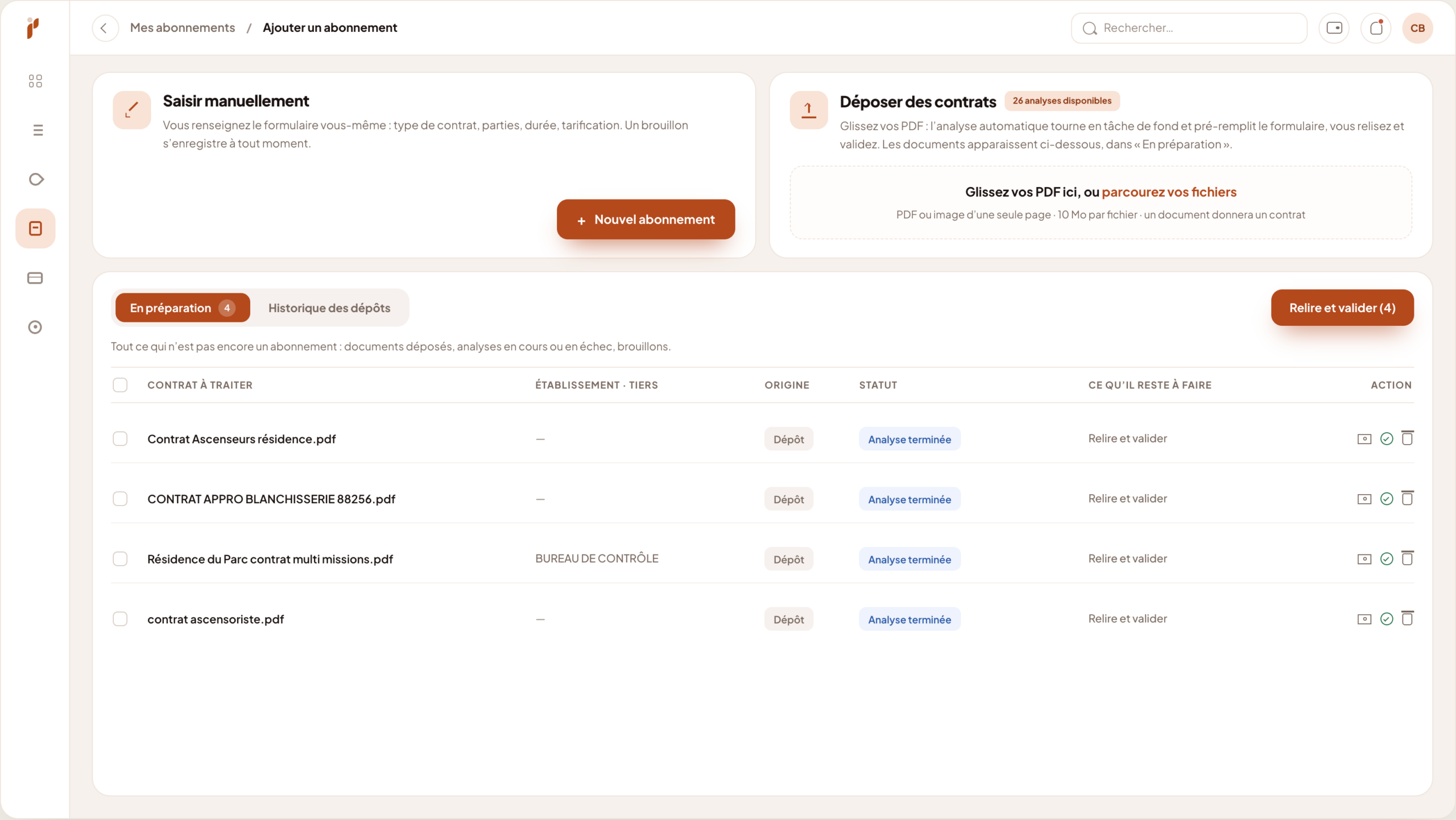
Keying a supplier contract in by hand takes a good half hour, and nobody enjoys it. AI import reads the document and pre-fills the subscription: you read it back, you correct, you confirm.
- PDF, scan or photo
- Twenty-four fields picked up
- Every field sourced
- You stay in control
Filing is not the bottleneck — keying in is
A contract repository does not fill up because someone decided it should exist. It fills up if entering a contract costs a few minutes rather than half an hour.
A supplier contract runs to a few pages, but you have to pull some twenty pieces of information out of it: the parties, the signature date, the effective date, the commitment term, the renewal, the notice period, the deadline, the amounts, the billing frequency, the payment method. Each one sits somewhere different, sometimes in an appendix, sometimes buried in the middle of a clause. Multiply that by the number of contracts in one property, then by the number of properties: picking up the backlog becomes a project nobody starts. So you enter the contracts you have to hand, you put the rest off, and the repository stays half empty — which is to say useless for deciding anything.
The backlog never gets started
Thirty minutes a contract, a hundred dormant contracts: the arithmetic alone pushes the job from one quarter to the next.
Contracts stay in inboxes
Until the document becomes a record, it alerts nobody and compares to nothing.
Manual entry gets it wrong
Confuse the effective date with the signature date and the whole notice calculation goes astray.
What the import does
The principle fits in one sentence: the machine reads and proposes, you check and decide. Nothing is saved without your say-so.
-
It reads what you actually have
Native PDF, scanned document, several pages, even a photo taken on a phone: the file does not have to be pristine to be usable.
-
Twenty-four fields in one pass
Subscription name, reference, property, third-party type, supplier, contract type, signature and effective dates, commitment term, end of commitment, renewal term, notice period, deadline, billing type and frequency, amounts, period, payment method, direct debit day, chart of accounts, categories and note.
-
Every field shows where it came from
The proposed value comes with the passage of the contract that produced it. You do not have to take the machine at its word: you read the line and you decide.
-
You confirm, and only then does the subscription exist
Until the record is confirmed, the document stays under “In preparation”. No contract enters your repository without a human having read it back.
-
Several contracts in a row
You drop a batch, the import runs in the background while you do something else, and you review the records when they are ready.
-
The document stays attached
The original contract is archived with the subscription it created. The record and its source no longer drift apart.
How it goes
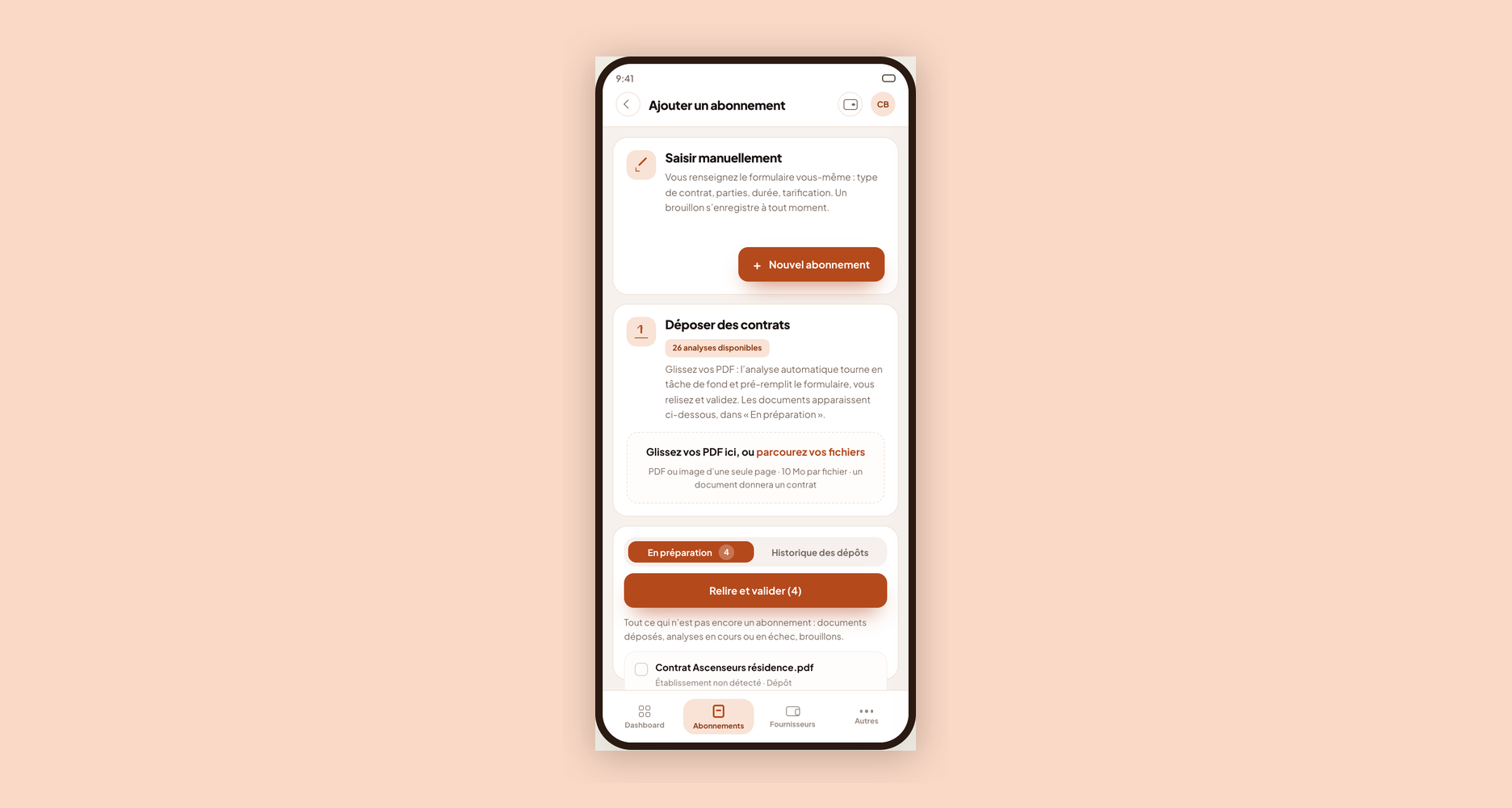
Nothing to configure, nothing to install: the feature sits inside the screen where you create a subscription.
-
You drop the document
From “Add a subscription”, you drag the file into the drop zone or pick it from your computer.
-
The import runs while you do something else
It runs in the background. You can drop the next batch or leave the screen, and the work carries on.
-
The document moves to “In preparation”
That is the queue: what has been imported, what is running, what failed. Nothing is lost between the drop and the record.
-
You read it back and correct it
Each field found appears with its citation. You change what needs changing and fill in what the contract does not say.
-
You confirm: the subscription is created
The record joins the repository with its dates, its amounts and its source document. Deadline alerts start from there.
What you gain
Picking up the backlog becomes realistic The job you kept postponing gets handled in batches, between two other tasks.
Dates are read, not retyped Effective date, end of commitment, notice period, deadline: they come from the contract itself, not from a tired end-of-day entry.
The check stays human The citation beside each field makes verification quick, and confirming remains a deliberate act.
The batch waits until you have time You drop in the morning, you review in the afternoon: the queue holds without losing anything.
Frequently asked questions
Does the contract have to be a clean PDF?
No. A native PDF is obviously ideal, but a scanned or photographed document is read too. The sharper the image, the more reliable the extraction: a photo taken at an angle in a corridor will give a less complete result than a flat scan, without being unusable for all that.
What happens if the import gets something wrong?
Nothing irreversible, because no value is saved without your confirmation. Each field is proposed with the passage of the contract it was taken from: you can see at once whether the machine read the right line, and you correct it before saving.
What if a piece of information is not in the contract?
The field stays empty and you fill it in yourself. The import does not guess: it extracts what is written. A contract that does not mention its notice period will not produce one — it is up to you to enter it if you know it from elsewhere.
Are my contracts used to train a model?
Your documents are processed to produce your record, and stay attached to your subscription in your own workspace. For the detail of how they are processed and retained, our team will answer precisely during the demo.
Can I import from a phone?
Yes, the drop screen also exists in a mobile version. You photograph the document or pick it from your device, and it joins the same “In preparation” queue as at the desk. Handy for a contract signed in a meeting, which you can drop before forgetting it.
Can we still key contracts in by hand?
Of course — both routes sit in the same screen. Many properties use the import to pick up their existing stock of contracts, then key in new ones as they come, since they have them in front of them at signature anyway.
Explore further
AI import speeds up data entry; the method stays yours.
Bring a contract, we will import it in front of you
Take one of your supplier contracts, even a badly scanned one. We drop it during the demo and you see what Pilboard pulls out of it, field by field.
🔍 Analysez ces fonctionnalités avec une IA
Approfondissez ce contenu en un clic : résumé, cas d’usage, ou conseils personnalisés.
 ChatGPT
 Perplexity